







SmartForge - Forge your Enterprise with AI
From Integration to Intelligence. SmartForge understands your business across systems—reasoning over operations like orders, inventory, and workflows to deliver unified, actionable intelligence.
Unifies fragmented system states into a single business truth
SmartForge empowers business and technical users to design, govern, and interact with their enterprise through a unified intelligence layer.
Built for Unified Operational Excellence
SmartForge provides ease of connecting your systems across the enterprise, defining business logic, and securely orchestrating intelligent workflows through Cortex, our enterprise AI conversation agent.

Developer Workspace
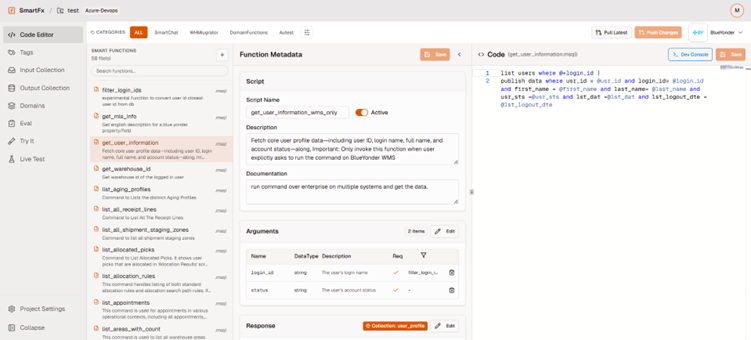
Designed with developers in mind, SmartForge Studio offers an intuitive interface that allows your team to define business logic, map user intent to system actions, and govern how SmartForge executes across your enterprise systems.
- Modern, Intuitive UI – A clean dashboard for managing projects, systems, and functions, suitable for both developers and platform owners.
- Monaco Code Editor – Edit Python, SQL, or MOCA/MSQL code with syntax highlighting, plus a visual metadata builder for no-code schema edits.
- Git Status Awareness – See modified, added, or deleted files at a glance, with built-in diff viewer and revert options.
- Searchable Help Panel – In-app documentation backed by your repo’s own content, so help is always a click away.
This complexity limits agility, delays decisions, and increases operational friction.
- Developer Workspace
- Manage Connections and Credentials

Manage Connections and Credentials
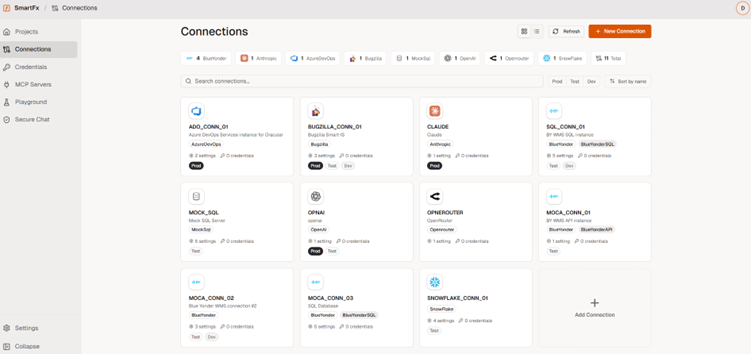
Create connections to your systems and manage credentials securely.
- Create new connections – Configure API endpoints, secrets, and system details in one place.
- Connect to leading enterprise platforms – Choose from OpenAI, Claude, Snowflake, Enterprise, and more. All working together to drive business excellence.
- Add or update credentials anytime – Securely manage authentication for every connected system.
Pre-Built Blue Yonder WMS Library
SmartForge comes pre-packaged with a growing library of Blue Yonder WMS integrations. This allows organizations to accelerate implementation, reduce development effort, and start leveraging AI against warehouse operations much faster.
- Out-of-the-Box Connectivity – Connect to Blue Yonder WMS using REST APIs, MOCA, and SQL without building integrations from scratch.
- Reusable [HA1] WMS Intents – Reuse pre-built intents designed for Blue Yonder WMS environments, allowing teams to quickly connect business processes, data, and AI-driven actions.
- Enterprise-Wide Integration – Connect to virtually any ERP, database, or business application in your environment, including Blue Yonder WMS, through a single integration layer.
- MCP-Enabled Intents – Expose Blue Yonder WMS intents as Model Context Protocol (MCP) endpoints, allowing AI agents and enterprise applications to securely access and execute business functions.
- Accelerated Time-to-Value – Reduce implementation effort and start delivering AI-powered business outcomes faster.
- Pre-Built Library
- Enterprise Integration Ready
Enterprise Integration Ready
SmartForge is designed to connect and orchestrate data across your enterprise technology landscape. Through SmartForge Nexus, organizations can establish an Enterprise Mesh that securely connects systems, governs access, and enables AI-powered interactions across business applications.
- Connect Enterprise Systems – Integrate with platforms such as Blue Yonder WMS[HA2] , Salesforce, JD Edwards, Snowflake, Oracle, SQL Server, and other business applications.
- Enterprise Mesh Architecture – SmartForge Nexus acts as an enterprise mesh, connecting systems and creating a unified, governed layer across the organization.
- MCP Exposure Layer – Securely expose enterprise systems, data, and business capabilities as MCP endpoints for AI assistants, agents, and automation platforms.
- Unified Data Access – Create a single source of truth by bringing together information from multiple systems and data sources.
- Scalable & Extensible – Easily expand integrations as your technology landscape evolves without redesigning the platform.
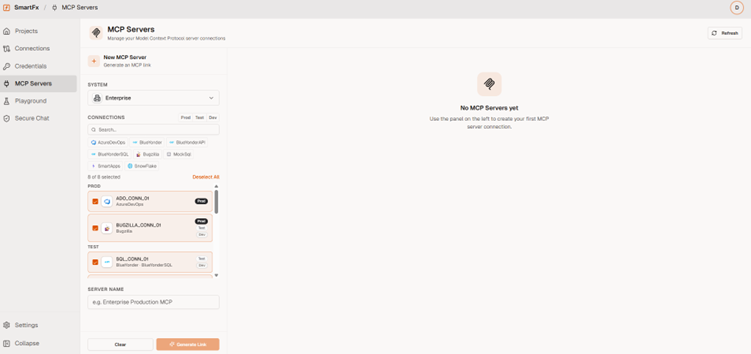
MCP Server Integration
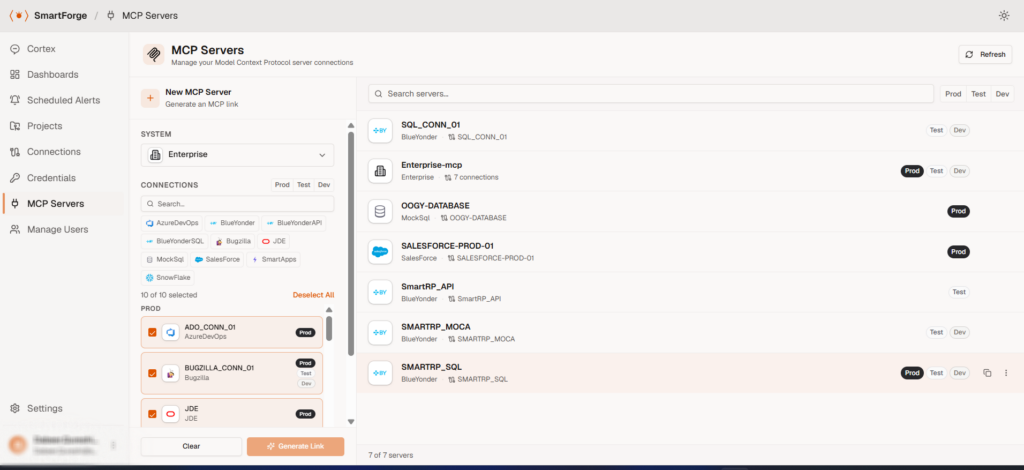
Connect SmartForge to external systems and expose enterprise capabilities as MCP tools for AI agents, enabling secure interaction between your internal platforms and the broader AI ecosystem.
- Generate MCP Links – Turn your enterprise functions into live MCP servers with a single click. Once generated, these links are ready to be plugged into any AI platform that supports MCP, including Microsoft Copilot, OpenAI, and Claude.
- Inspect & Validate Tool Lists – Browse the full list of tools exposed by your MCP server and verify they are correctly defined before going live. Use the built-in Chat feature to interactively test and run your tools end-to-end, exactly as an AI agent would.
- Export to Any MCP-Compatible Platform – Deploy your MCP server to any platform that supports the MCP standard. Each export comes with a tailored, step-by-step setup guide, so your team can integrate quickly — no guesswork, no manual configuration.
- Centralized Connection Management – Manage all your MCP-enabled system connections from one place. Update, revoke, or regenerate links without disrupting downstream integrations.
- Built for Enterprise Workflows – Your existing SmartForge functions, business logic, and system connections are automatically surfaced as structured AI tools — no rewrites, no duplication, no extra infrastructure.
- MCP Server Integration
- Centralized Metadata Management

Centralized Metadata Management
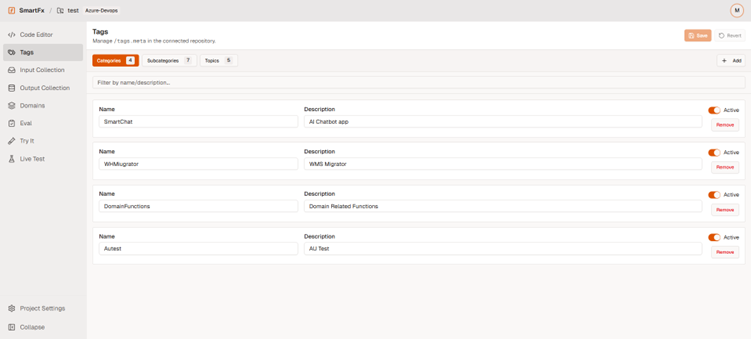
Keep every function consistent across your repository. With shared tags, domains, and reusable collections, your entire codebase stays aligned—automatically.
- Tags & Domains – Define global tags and reusable domain fields once—including data types, enums, and required flags. No more drifting schemas or manual audits.
- Input/Output Collection - Create reusable arguments and response structures for every business intent. Write once, reuse everywhere—across functions, services, and teams.
- Consistency at Scale – Eliminate copy-paste drift. Every function follows the same schema patterns, so your system stays predictable, maintainable, and safe to evolve.
- This structured metadata is how SmartForge builds true business understanding—enabling consistent, reliable reasoning across every system you connect.

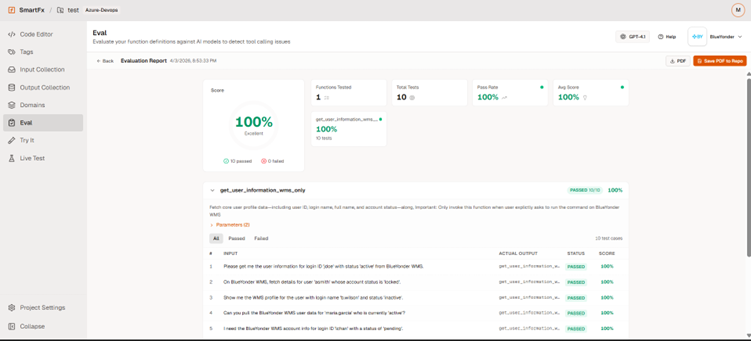
Function Evaluation – Test your business logic Before You Deploy
Validate how well your LLM selects the right tool. Detect overlapping descriptions, missing arguments, and ambiguity before your functions ever reach production.
- AI-Generated Test Questions – Tests with all tools loaded simultaneously to stress-test for confusion and force the LLM to choose correctly.
- Scored Reports with Traces – Generates a detailed score report for your functions, showing exactly what was sent, what was returned, and how each tool performed.
- What Eval Detects – Overlapping descriptions, vague argument names, ambiguous questions, and whether each tool works reliably on its own.
- Better Descriptions = Better Scores – Make descriptions specific and unique.
- Function Evaluation
- Smart Chat

Smartforge Cortex
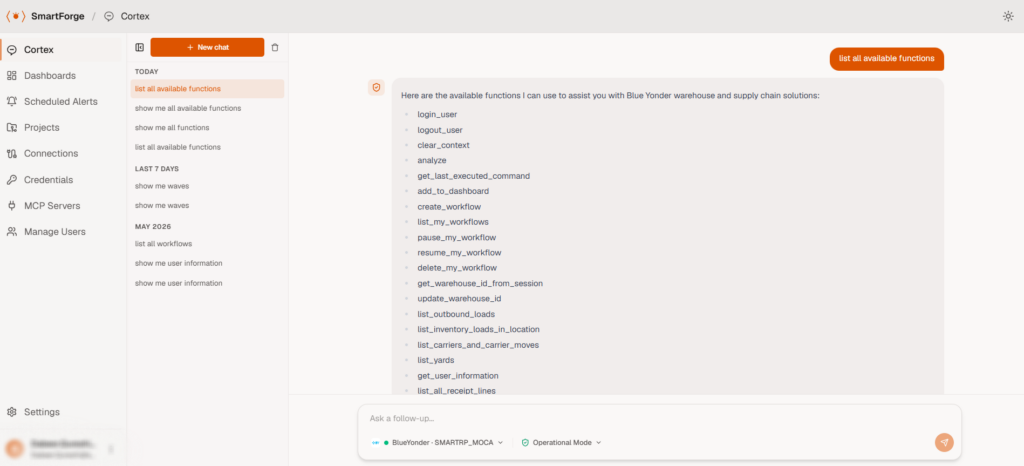
SmartForge Cortex is the secure conversational AI agent of SmartForge that enables users to interact with connected enterprise systems using natural language. It interprets user intent, applies enterprise business logic, and orchestrates actions across systems to deliver unified, context-aware responses in real time.
- Ask questions that return live operational data (for example orders, inventory, shipments, devices).
- Run approved actions and schedule workflows.
- Turn results into summaries, charts, and dashboards – Use natural commands to generate live charts, pin them to your dashboards, and start making better decisions instantly.
- See what happened behind the scenes – View your intent execution logic, the actual command the LLM invoked, and a live dashboard tailored to your business context.
- Secure by design – Metadata only, no data exposure. Analysis and operations run in an isolated environment.
Why SmartForge
SmartForge empowers developers with a unified platform to build, govern, and scale enterprise AI solutions across connected systems
Unified AI Architecture
A unified platform that brings together SmartForge Studio, SmartForge Nexes, and SmartForge Cortex to design, govern, and execute enterprise AI workflows across connected systems.
Secure Execution Layer
Ensures every request is validated, permission-checked, and executed through approved logic with full governance and role-based access control.
Function-Driven Design
Define reusable, version-controlled functions that standardize how AI interacts with enterprise systems and executes business logic.
Multi-System Intelligence
Understand and reason across WMS, ERP, CRM, and more—unifying fragmented system states into a single, consistent business view.
Built-In Evaluation & Testing
Validate tool selection, detect ambiguity, and test business logic before deployment using integrated evaluation frameworks and reporting.
Extensible Integration Layer
Connect external systems via native protocols and expose capabilities as tools for AI agents through MCP and managed integrations.
Where SmartForge Makes a Difference
Real-world scenarios where SmartForge enhances enterprise operations and development workflows.

Enterprise System Orchestration
Design and execute workflows across WMS, ERP, and other systems through unified, governed logic.


Multi-System Integration
Connect and manage multiple enterprise systems in one place, enabling seamless data flow and interoperability.


AI-Driven Operations
Leverage AI to automate decision-making, generate insights, and enhance operational efficiency in real time.


Testing & Validation
Validate business logic, tool selection, and system behavior before deployment using built-in evaluation and testing capabilities.

Real-Time Insights & Dashboards
Transform live system data into actionable insights, summaries, and visual dashboards for better decision-making.

Observability
Identify and resolve issues quickly with full visibility into execution flows, system interactions, and responses.
Got Questions? We've Got Answers
Get quick answers to common questions about SmartForge features, functionality, and workflow.
SmartForge Cortex is the AI conversational interface of SmartForge that enables users to interact with enterprise systems using natural language.
You can:
- Retrieve live operational data
- Run approved workflows
- Ask follow-up questions
- Generate charts and dashboards
Cortex is API-centric, not document-based.
|
Feature |
Document Chat |
SmartForge Cortex |
|
Data source |
Static documents |
Live systems |
|
Accuracy |
Depends on documents |
System-verified data |
|
Actions |
Not supported |
Supported (approved only) |
|
Freshness |
Can be outdated |
Real-time |
Yes, Cortex maintains session context, so users can:
- Refine results
- Ask incremental questions
- Build on previous responses
Yes—but only if:
- The function is pre-approved
- The user has the required permissions (RBAC)
No arbitrary or unsafe actions can be executed.
Yes, From any dataset, users can:
- Create charts (pie, bar, line, stacked, etc.)
- Generate dashboards automatically
- Analyze trends without manual setup
- No ETL or data duplication
- Real-time, federated execution
- API-driven (not document-based)
- Built-in governance and security
- Low-code extensibility via Smart FX
Traditional integrations rely on data replication (ETL) and point-to-point connections.
Nexus is query-centric:
- No data copying or syncing
- Queries run directly on source systems
- Results are merged in real time
This reduces latency, complexity, and maintenance.
SmartForge Nexus is the secure execution layer of SmartForge, built on our Enterprise Mesh architecture.
Enterprise Mesh is a query-centric orchestration layer that connects SmartForge Cortex requests to approved enterprise systems, executes them in parallel in real time, and returns a single, unified response.
Use it when:
- Data is spread across multiple systems
- Real-time answers are required
- Actions must be secure and governed
- A unified interface is needed
SmartForge studio is the builder platform where teams create and manage functions for their systems.
It provides:
- Function definition (metadata + implementation)
- Connections to enterprise systems
- Evaluation tools (to test AI tool selection)
- Governance via Git
A Function is an approved capability that SmartForge can execute, such as:
- Fetching data (orders, inventory, shipments)
- Running workflows
- Calling APIs or system commands
Each function includes:
- Implementation (code/script/API)
- Metadata (inputs, outputs, description)
- User asks a question in the chat interface of Cortex.
- LLM extracts intent + parameters
- A matching Function is selected
- SmartForge Nexus validates permissions and inputs
- The function executes on target systems
- Results are returned in a user-friendly format
It combines several steps:
- Runs federated queries across systems (ERP, WMS, TMS, etc.)
- Performs live aggregation of responses
- Applies on-the-fly transformations (filters, grouping, calculations)
- Uses business-defined reducer logic to select the final result
The outcome is a single, consistent answer.
Any system with an API, including:
- WMS (e.g., Blue Yonder, Manhattan)
- ERP (e.g., SAP)
- CRM (e.g., Salesforce)
- Data platforms (e.g., Snowflake)
- Custom REST / SQL / proprietary systems
No.
SmartForge Nexus does not store or duplicate data. It executes queries directly on source systems and returns results in real time.
No.
- The LLM only receives user query + metadata
- All execution happens inside your environment
- No raw business data is exposed externally
For analytics:
- Only column names (and optional small samples) may be used
- Full datasets remain internal
Security is built-in at multiple levels:
- RBAC (role-based access control)
- Approved functions only (no arbitrary execution)
- Centralized validation and permissions
- Secure API layer
Users can only access what they are authorized to see and run.
SmartForge Nexus supports secure tracking, including:
- Who made the request
- Which function was executed
- Execution timing and run IDs
- Masked parameters
Sensitive data is never logged or exposed.
Yes (if enabled).
Users can:
- View executed commands or API calls
- Understand how their request was processed
- Troubleshoot results
Try SmartForge Today, It’s on Us!
Get Access to SmartForge today and experience the difference in your Blue Yonder development workflow.
Get Access To SmartForge
Copyright © 2026 Smart IS International. All Rights Reserved.