



















Accelerate your WMS Blue Yonder Upgrades
Smart IS’s Warehouse Migrator is a purpose-built solution designed to simplify and accelerate Blue Yonder WMS migrations. It enables seamless configuration and data transfers across environments, reduces manual effort, and ensures data accuracy. It streamlines migration processes with robust validation, customizable controls, and secure automation while minimizing risk and downtime.
Faster Migrations
Cut migration timelines from weeks to hours with automation.
Successful Migrations
Trusted by enterprises to streamline Blue Yonder WMS upgrades.
Zero Data Loss Guarantee
Built-in validation ensures safe, consistent transfers every time.
100%
Blue Yonder Compatible
Comprehensive Audit Trails
Detailed logs and CSV exports for full traceability.
Lower Costs
Reduce rework, downtime, and IT overhead.
Redefining Data Migration
Engineered To Optimize Every Stage of Your Blue Yonder WMS Upgrade and data migration.
Simplified Configuration Migration
Warehouse Migrator enables seamless transfer of Blue Yonder WMS configurations between environments with minimal manual intervention.
- Reduces the risk of data inconsistency and migration errors.
- Streamlines the movement of configurations using file-based or rollout methods.
- Ensures consistent setup across development, test, and production environments
- Supports direct load, rollout-based deployment, and remote environment transfers
- Simplified Configuration Migration
- Controlled Data Extraction & ID Translation
Controlled Data Extraction & ID Translation
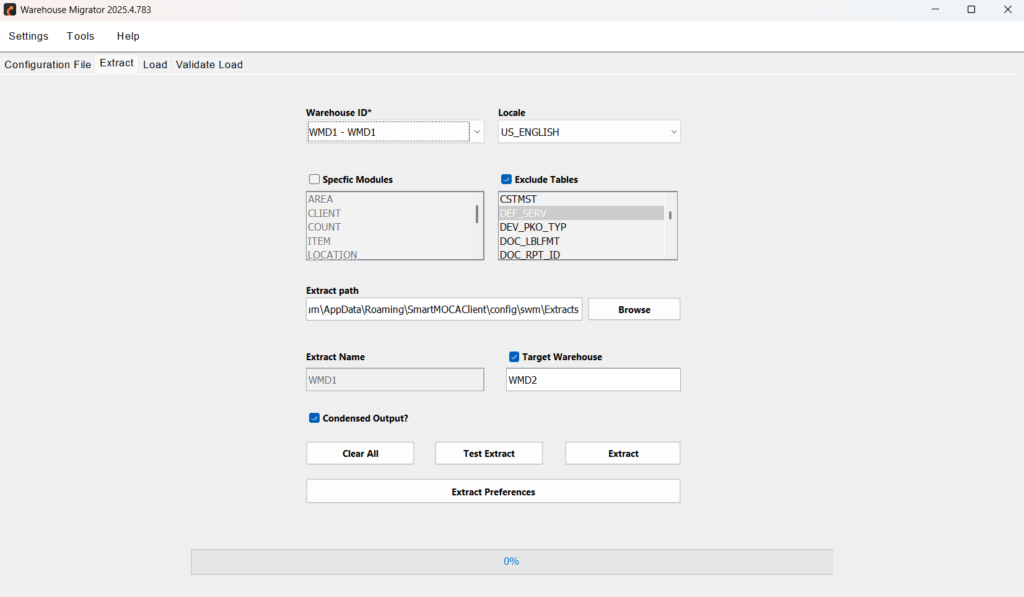
Extracts required data by warehouse, module, or table to control scope and avoid unnecessary movement.
- Supports targeted extraction across environments or instances (version 8.2 and above).
- Excludes unwanted tables or columns to streamline datasets.
- Automatically translates ID-based relationships into readable codes aligned with the Blue Yonder WMS data model.
- Simplifies complex data structures and improves clarity during data review.
- Ensures referential integrity across environments and supports easier troubleshooting.
Data Load Validation & Error Tracking
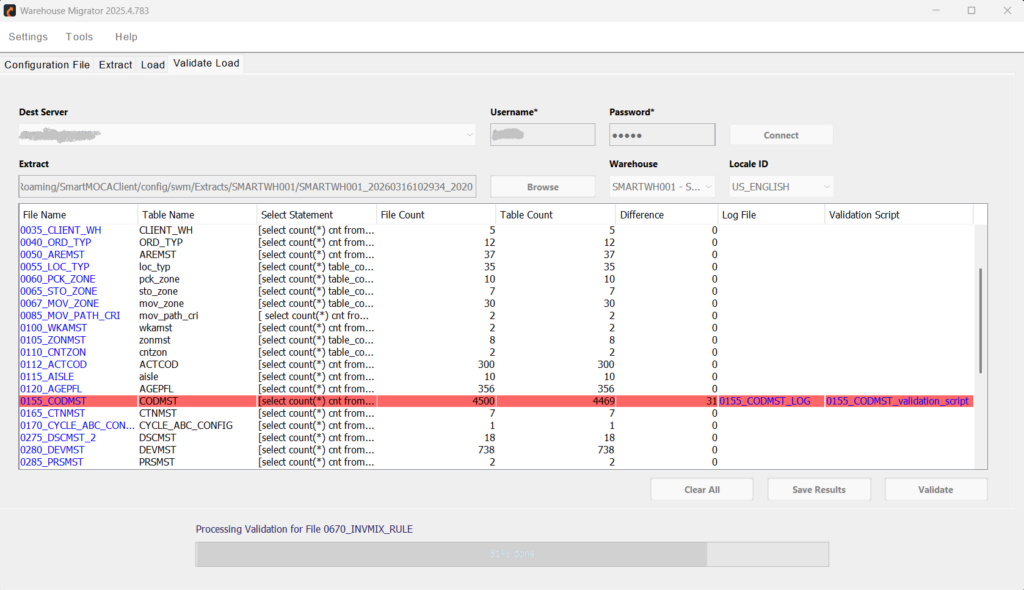
Ensures data is accurately loaded into the target environment by validating it against the source, while identifying and reporting discrepancies early through detailed error logs.
- Compares source and target data for validation.
- Generates comprehensive error logs and provides validation scripts with references for troubleshooting.
- Supports CSV exports for audit and documentation.
- Data Load Validation & Error Tracking
- Named Data Sets for Reuse
Named Data Sets for Reuse
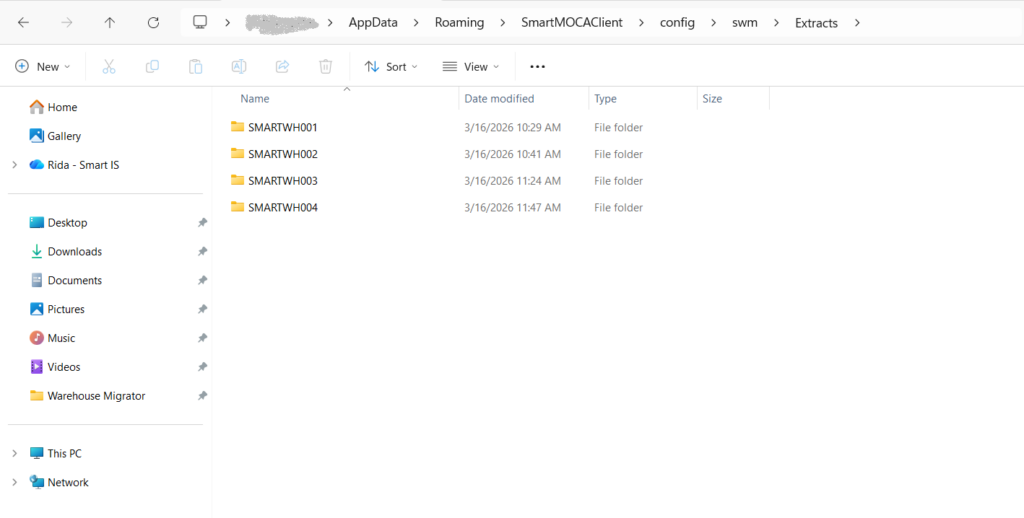
Save extracted configurations as named datasets for repeatable, consistent migrations across multiple projects or environments.
- Enables quick recall of common data sets.
- Supports repeat migrations with consistency.
- Saves time in test and validation scenarios.
Server Connection Management
Manage connections across multiple environments with ease and security.
- Add, update, or remove server connections as needed.
- Configure and manage connection strings securely.
- Seamlessly switch between development, test, and production environments.
- Server Connection Management
- User Preferences & Configuration
User Preferences & Configuration
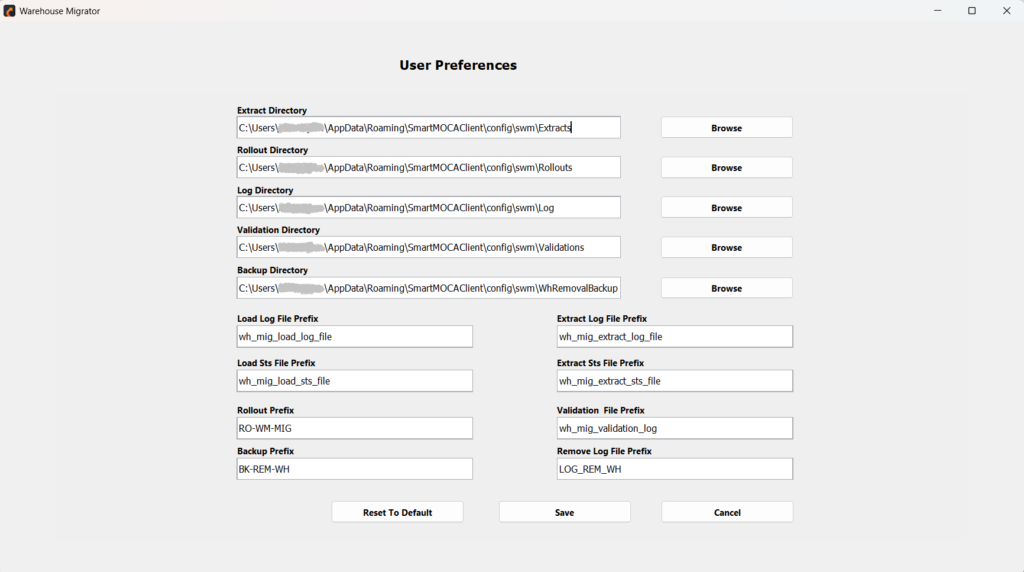
Customize settings to align with your workflow and migration needs.
- Configure default directories and file paths.
- Customize file naming conventions and prefixes.
- Adjust execution settings for better control and flexibility.
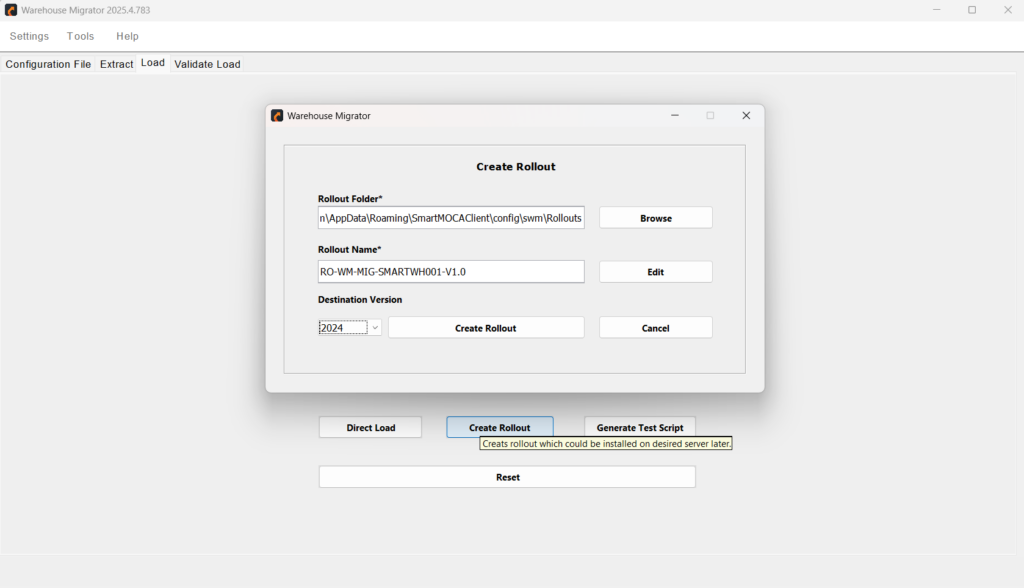
Rollout-Ready Deployment
Easily package configurations into rollout files to enable structured, consistent, and compliant deployments in SaaS environments.
- Supports Blue Yonder SaaS rollout standards.
- Creates control files matching data layouts.
- Enforces the correct loading sequence to maintain parent-child relationships.
- Rollout-Ready Deployment
- Test Script Generation
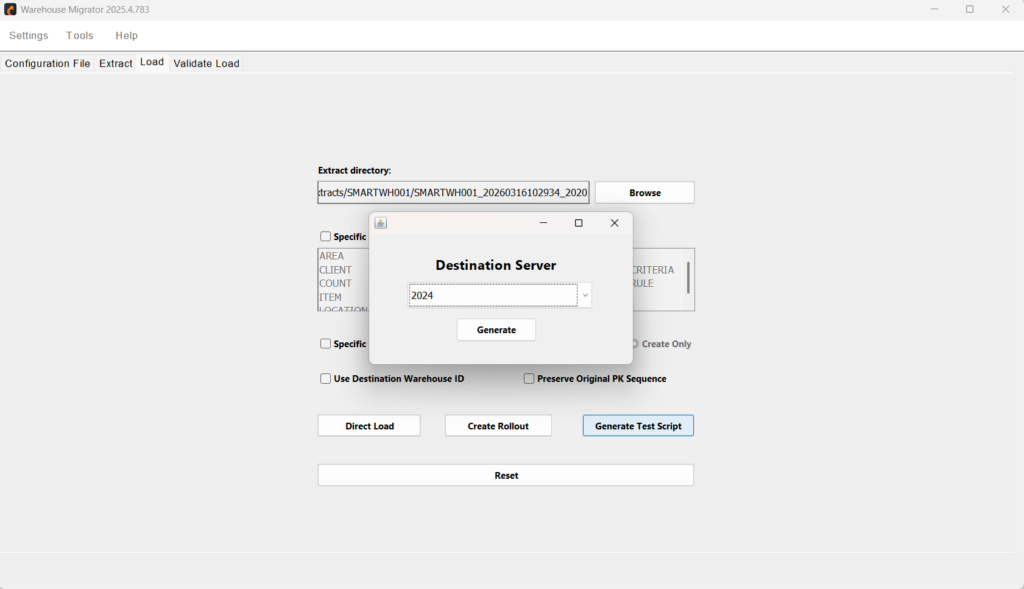
Test Script Generation
Validate migrations effectively using controlled test scripts.
- Generate test scripts for data loading validation.
- Supports sample-based testing (e.g., limited data rows).
- Helps verify accuracy before executing full-scale migrations
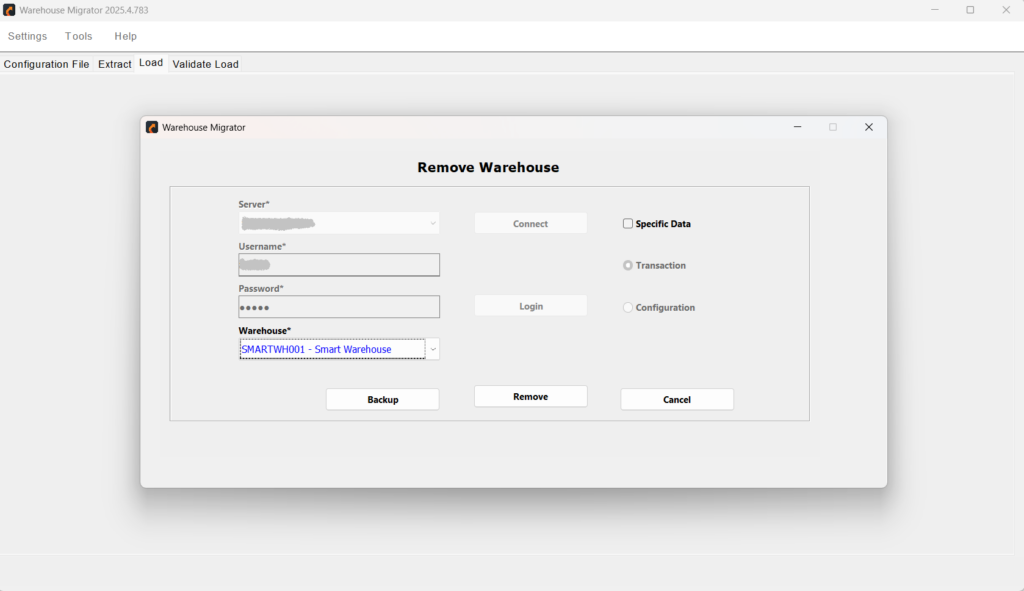
Warehouse Removal & Cleanup
Maintain clean and controlled environments by removing unnecessary configurations.
- Remove entire warehouse configurations from target systems.
- Delete specific datasets or modules when required.
- Safe removal of warehouse with backup and admin approval.
- Warehouse Removal & Cleanup
Why Warehouse Migrator
Trusted for its precision, speed, and flexibility to execute seamless Blue Yonder WMS migrations.
Faster Time-to-Migrate
Automate extraction, loading, and validation to reduce migration timelines from days or weeks to just hours.
Improved Data Consistency
Ensure uniform configuration across environments with controlled, repeatable migration processes.
Lower Operational Costs
Minimize rework, downtime, and IT effort reducing overall costs associated with manual data handling.
Increased Flexibility in Deployment
Support both rollout-based and direct data loading to align with your organization’s operational or compliance needs.
Seamless Environment Management
Easily move data between development, QA, and production environments without disrupting operations.
Enhanced Auditability and Control
Gain visibility into every migration step with detailed logs, test runs, and validation reports.
Where Warehouse Migrator Makes a Difference
Real-world scenarios where Warehouse Migrator shines in Blue Yonder migration.
Warehouse Cloning
Duplicate an entire warehouse configuration or subset with a few clicks to support new site onboarding or parallel testing.
Targeted Data Migration
Migrate only specific modules or configuration sets like allocation rules or location setups without affecting the rest of the system.
Disaster Recovery Testing
Efficiently extract and reload configurations to validate recovery environments, ensuring readiness for system failovers or outages.
Configuration Backup and Restore
Create versioned backups of warehouse configurations and restore them on-demand to recover from errors or rollback unwanted changes.
Stay Informed. Stay Inspired
Unlock the Full Power of Blue Yonder with Our Latest Articles.
Technology has a habit of making us believe that every…
- June 12, 2026
In earlier posts, I argued two related ideas: This post…
- April 2, 2026
Everyone wants to “add AI” to their systems — but…
- February 17, 2026
Warehouse operations are evolving, and staying ahead requires technology that…
- Saif Ali
- March 17, 2025
Efficient warehouse management is critical for businesses to maintain operational…
- Saif Ali
- March 13, 2025
Warehouse operations live and die by efficiency. Every second saved…
- Saif Ali
- March 10, 2025
A Warehouse Management System (WMS) is one of the most…
- February 19, 2025
Utilizing the appropriate technology can significantly impact whether a business…
- Saif Ali
- February 7, 2025
In warehouse environments, having a centralized view of critical KPIs…
- January 28, 2025
Supply chains today are becoming more complex than ever, with…
- November 27, 2024
Got Questions? We've Got Answers
Get quick answers to common questions about Warehouse Migrator features, functionality, and workflow.
The tool supports both. You can extract and migrate an entire warehouse or select specific modules, tables, or functional areas for targeted data movement.
Warehouse Migrator includes built-in ID translation capabilities to map ID values to readable codes, preserving relationships and ensuring integrity across environments.
Yes. The Validate Load feature compares extracted data with the destination database, highlights discrepancies, and generates detailed error logs for review and correction.
Absolutely. You can extract and save named datasets as backups and reload them when needed, making it a reliable tool for disaster recovery and configuration rollback.
Warehouse Migrator creates rollout packages with customized control files and ordered loading sequences, ensuring compliance with Blue Yonder SaaS deployment protocols.
Yes. The tool offers Remote Call functionality that enables direct data transfers between source and target environments, bypassing the need for manual file handling.
The tool uses authenticated connections with configurable user credentials for all server interactions. It supports secure data management practices throughout the migration lifecycle.
The tool enforces a master/child data hierarchy, ensuring that dependent configurations are loaded in the correct sequence to avoid relationship or integrity issues during migration.
Yes. You can tailor extractions by including or excluding specific modules, tables, or columns, enabling precise control over what data is moved between environments.
Yes, Warehouse Migrator allows controlled removal of warehouse configurations or selected datasets from connected environments.
Yes, users can add, update, and manage multiple server connections securely.
Yes, it supports generating test scripts for validating migration with sample datasets before full execution.
Ready to Simplify Your Blue Yonder WMS Migrations?
Streamline your configuration transfers, reduce errors, and take control of your warehouse data workflows — all with just a few clicks.
Get More Details About Warehouse Migrator
Copyright © 2026 Smart IS International. All Rights Reserved.


