A JDA (BlueYonder) Perspective
By Khurram Ahmad, CEO of Smart IS International
INTRODUCTION
So, you (or your company) have decided to upgrade your JDA/Blue Yonder WMS to a later version. Chances are that you are opting to go to the 2017 version and wondering how successful this venture will be and what pitfalls await you?
The success (and failure) of any project lies in the expectations that are baked into the realization of the project. All companies usually require justification for such an expense and the justification takes shape with ROI expectations or overcoming the technology gaps currently faced based on your current version.
Regardless of the justification matrix created, one key element remains, which is that this is an upgrade, and the warehouse needs to continue to function at least at the same level as it is currently and any disruption in that will be a huge negative going forward.
IMPLEMENTATION METHODOLOGY
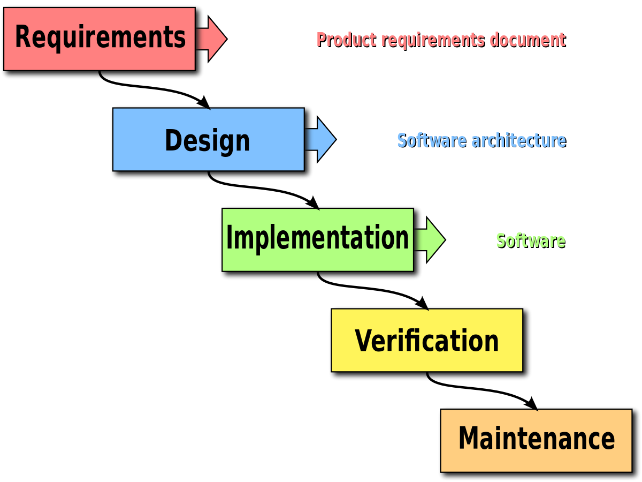
Every company or vendor has a methodology for bringing their project to fruition. All methodologies generally have the following key steps:
- Requirements — Gather the current requirements and layout the basic scope foundation for the project
- Design — Convert the requirements into implementable options based on the constraints of the available software
- Implementation — Working with the design elements and the available software, bring the vision of the requirements to fruition
- Verification — Validate the requirements through the lens of the software to ensure viability of the processes
- Maintenance — Continue the use of the software with little to no help from the vendor that did the implementation
Given the fact that we are doing an upgrade, the implementation methodology needs to be fast-tracked because:
- Our four walls are the same
- Our labor force is the same
- Our In/Out processes are the same
The only potential change that an Upgrade can bring is the possibility of new features and how they may impact our current processes and while this is an important consideration, it needs to be handled on its own based on a given feature (more on this later).
UPGRADE METHODOLOGY
Keeping in view of the previously laid foundation, the upgrade methodology needs to be fast-tracked as follows:
- Requirements — Validate that our requirements are still the same (depends how long ago your initial implementation was). However, if the WMS is in use, chances are the requirements are current and up to date
- Design — If the WMS is in use, then the designs should be up to date. Regardless, the JDA (RedPrairie) application is very much self-documenting and thus most of the information can easily be taken from the application dictionary
- Data Conversion — This is a new step that is added, where the current version data (both transactional and setup data) is migrated based on the dictionary requirements of the new version
- Delta Conversion — See below for more explanation on this. This step is introduced to add any new feature’s setup to be added after the old application is converted. This step ensures that multiple data conversions can be done and validated before Go-Live
- Implementation — The above-mentioned Data Conversion pseudo implements the new version
- Verification — Validate the requirements through the lens of the upgraded software to ensure viability of the existing processes
- Maintenance — Continue the use of the software with little to no help from the vendor that did the implementation
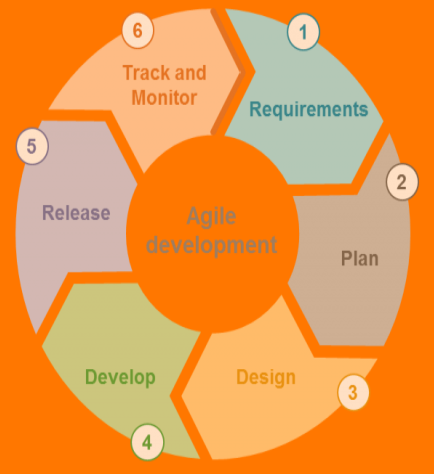
Once the current level of functionality is achieved using the above methodology (which should happen rather quickly), the users are engaged to explore the new version hands-on and discuss the options to utilize any new features.
Here again, we recommend that any new feature being implemented should be added as “Delta Conversion” on top of the “Data Conversion” so multiple passes of conversions can be done for each test cycle with fresh data.
NEW FEATURES IN JDA RELEASES
Depending upon the version you maybe upgrading from, the available feature list can be long. The following is a list of key new features since version 2009. The list is mixed with technical enhancements (data dictionary, architecture etc.) and functional enhancements with the availability of new features. The list is not in any strict order. However, it is progressive from earlier to newer version:
Customization Impact — If there is high level of customizations in the current version, then the following changes will require them to be re-implemented or envisioned:
- Jasper reports — New reporting software. A conversion software is available that can convert existing reports. However, minor tweaking is needed depending upon the complexity of the current report
- Java based RF screens — Any custom RF screens will need to be developed again. A conversion is possible, but it is recommended to redevelop. If your current customization is on a standard JDA RF screen, then please consider newer options that can be availed through the Java architecture for customizing standard screens
- PCKWRK split into two tables — Any custom MOCA commands will need to have a changed made to (at minimum) PCKWRK_VIEW. It is recommended that it not be a blind conversion, especially if PCKWRK is being joined to other tables
- Order level allocation rules, and getting rid of Lot, Origin and other values from Order Line — This mainly has impact on Integration if these fields were being passed from the host. However, if there are any MOCA commands that were relying on the availability of these values on ORD_LINE then they need to change
- Custom Inventory Attributes — This can have a positive effect on any customizations if currently you have custom columns on INVDTL. However, since this is an upgrade, you will need to evaluate the Plus/Minus of having a custom attribute and keeping a customization, or utilizing this feature and getting rid of the customization but endure new testing requirements
- MOCA Strict ANSI Check for NULL — This can impact your custom MOCA code
- MOCA requiring ending “]” bracket for SQL Statements — Can be an impact on custom SQL statements if not fully enclosed in “[]”
Infrastructure Changes
- Java based architecture (no more windows-based registry)
- Clustering Enhancements
- MOCA Internal Tables
- MOCA Asynchronous Execution threads
- Tasks and jobs moved to database tables and obsoleting SALDAEMON
- Web client
- Security added to Location override
- New Parcel options
Dictionary Changes
- PCKWRK Split into two tables
- Storage Rules moved to its own dictionary setup allowing for more flexibility in providing new columns for rules
- Area unit of measures and controlling pick and/or storage allowed at UOM level
- Picking rules controlled at UOM level
- Dictionary changes with various setup attributes moving to their own tables and out of Policy Tables
- Moving list setup to picking rules instead of an area attribute
- New dictionary around Area/ Location relationship and setup
Functional Enhancements
- List pick enhancements with starter pallet
- List Picking Rules
- Order notes rules-based visibility on RF with exit points
- New Putaway screen in RF
- Putaway rules based on Source Area
- Sharing of Receiving and Shipping Staging
- Storage trailers and one step shipping for them
- Location override codes
- More exit points for Workflows
- Dynamic movement paths
- Carton in Carton and bundling
- Pack station enhancements
- Load Trailer is like an Inventory Movement (with Inventory moving to RF first)
- New directed work options
- Pick Area groupings
- Various new RDT Screens (Like Putaway, Receiving and Identify combined into one, Blind Receiving, Asset screens and more)
WHY NOT RE-IMPLEMENT A NEW VERSION
The list provided above is quite intimidating and if I am moving from an older version to the newest, I would be tempted to simply undergo a new implementation, so I can tackle the new features as I implement. However, I must strongly caution against it. The fact remains:
- This is an upgrade
- My four-walls have not changed
- My product and its handling requirements are the same
- My processes (while may be impacted by a new feature) remain the same
The main benefit of the upgrade will be:
- Current and supported infrastructure
- Reduce some customizations from the previous implementation
- Improve an existing process by utilizing a new functional enhancement in the new version
Most certainly any of the benefits that you plan to gain from the upgrade that fall into the bottom two rewards mentioned above will be smaller in scale when mapped against the entire warehouse processes (and on average may not exceed 20%). Thus, converting existing data, including the setup information, into the new WMS setup provides for a faster route into getting your users into the new application, and experiencing the new application first hand.
Consider for example the List Pick enhancements that are available in the newer versions: It is difficult to envision the possibilities that rule-based Pick List generation can offer. An implementer can do a POC for you, but that is wasted effort and still not be very beneficial as you are not experiencing it based on your four-wall setup. On the contrary, if you have a converted application with all your four-wall setup and your production transactional data, the POC will be much more meaningful and you can experience it with actual data and not made up data.
In our experience with upgrades, we like to get our customers into the newer version within the month of kick-off, so they can start to interact with the new version first hand and start to create any ‘Delta Setup’ based on this experience.
CONCLUSION
An upgrade should never be treated as a re-implementation. Once this mindset is achieved, the cost is substantially contained. Otherwise, you will be looking at spending similar amounts as your initial investment. Furthermore, depending upon the validation requirement of your organization, a re-implementation may require the validation of the processes once again before they can be confirmed through the software, adding cost and burden on your current staff. Thus, a typical upgrade project should be as follows:
Kickoff — Discuss and agree on the project goals, timelines and personnel
New feature overview — Given that requirements are already known (remember that you have the same four-walls), your upgrade partner should recommend any suitable new features for consideration
Development Phase:
- Integration Conversions — Again, your four-walls are the same and your Hosts are the same, so the Integration conversions can start almost immediately and can be completed without any significant input from your users
- Custom Commands Conversions — The Upgrade partner should provide advice about customizations that should not be brought over in the first pass. However, chances are that larger percentage of your customization will be converted (based on MOCA and Dictionary changes mentioned above) and made available in the new version
- Data Conversion Scripts — The gap between your current version and the upgrade version may not allow you to utilize JDA provided conversion scripts. Furthermore, as mentioned above, we need to be able to incorporate our “Delta Conversions” into the upgrade as we progress through the upgrade. So, having our own sets of scripts that can be run as needed to convert the setup, as well as, the transactional data is very useful and essential
Verification Phase — Once the data is converted to the new version and commands and integration changes complete, the users can get into the application and start their acceptance testing. Usually, users can get into the new application with converted production data, as quickly as 1–2 months
New Features Implementation — This needs to be run feature at a time, allowing for features to be implemented and put in the application for verification. Since the new feature will be implemented against the existing Four-Wall setup, it will be more meaningful to the users.
End to End Testing — Once all unit level testing is completed, the End to End testing can begin, paving the path to a successful Go-Live
Go-Live and Maintenance