







Exploring the JDA/Blue Yonder Standard Solution: An Overview with Blue Yonder Consultants
An archive instance is a complete JDA/BY installation. The data from the primary instance is copied to the archive instance using MOCA remote execution capability. “Database Archive Maintenance” application is used to define this. This setup is done on the primary instance.
RedPrairie uses a policy on the primary instance to define the location of the archive instance.
- Use “INSTALLED” to indicate if the system is installed.
- Use “REMOTE-HOST” to specify the host and port of the archive environment.
- Use “LOCAL-ARCHIVE” to archive data to tables in the same instance. Use “TABLE-PREFIX” to determine the table name in that case. This is typically not used because in this case the existing applications cannot be used against the archive instance.
The setup is generally as follows:
1. Specify the main table that is being archived. This is the actual table name
2. Specify the duplicate action. This tells us what to do in case of a duplicate
a. Do we ignore the error and continue?, i.e. we do not error out and we do not replace the value. Typical for data that is only added.
b. Do we error out and rollback?
c. Do we replace the current data and continue.
3. After this, we specify the “List Command”. This command will list the rows from the primary data source that need to be archived. The filter will ensure that we correct the proper candidates; for example check statuses and date ranges.
4. Use “Post Archive Command” to specify the work that needs to be done once this object has been processed; for example we may purge the rows that were archived.
5. Use “Details” to specify dependent data that needs to be archived. This also specifies a list command. The “@” parameters refer to the variables that are returned by the row specified above in the “List Command”.
The above data is stored in the archdr and arcdtl tables.
The data is processed as follows:
1. Fetch the rows from the main table using the “List Command”. This would return multiple rows.
2. For each row returned.
a. Move the row to the archive environment.
b. For all “Detail” objects
i. Execute the “List Command”. This utilizes the context for the list command from the main table specified above.
ii. For each row
1. Move the row to the archive environment.
Issues with the standard solution
The above approach is quite sophisticated and works in some cases. We often see following types of issues:
1.. It processes one row at a time. This implies that if we are required to move 200,000 rows (a typical number for some of the large tables); we will require 600,000 independent operations (200,000 to read the data, 200,000 to move the data, and 200,000 to delete the data from the source).
2. The logic to move the dependent data uses the same row by row approach. For each row in the header table the data for the detail table is moved one row at a time.
3. The solution does not provide visibility to the archive process. The user cannot find out how archiving ran, how many rows were processed, or what was the status, etc.
4. If archiving fails for a period or if it is turned on some time after the go-live; archiving some of the larger tables like dlytrn becomes extremely difficult.
Archiving ++ by Smart IS
Our solution will keep the best of the RedPrairie solution and focus on optimizing it for high volume scenarios. The key part of our approach is to use database capabilities to transfer the data. While moving a million rows one row at a time is a significant task doing it using advanced database techniques is quite trivial and fast. Our solution uses the following techniques:
- We will use the database features to connect multiple database instances. For example on Oracle we will use “Database Links” and for SQLServer we will use “Linked Servers”. Our preferred approach is to co-locate the archive database in the same instance as the online database — this improves the performance even further.
- We will use the “insert into <target> select * from <source>” technique for moving the data.
- We will use “delete” with a where clause to delete the data rather than a delete that processes the data one row at a time.
- For updating the archive instance, we will do it in two steps:
a. Delete the target rows
b. Insert the new data
- We will use correlated queries between the two instances
- We will have generic, central components to do the work for any table.
- We will utilize the information in the database data dictionary to streamline the process of moving the data from the primary instance to the archive instance.
Our solution will employ the same database objects and applications as the JDA/BY standard solution. This will allow the users to easily switch from the JDA/BY Jobs to the jobs that we provide.
Implementation Details
All of archiving can be a single job or a set of few jobs
Our solution allows for setting up a single job that will run a set of pre-defined archives. We will do it as opposed to running an archive one at a time.
Archive Job Number (uc_ossi_arcnum)
Our solution introduces a new concept of an “Archive Job Number”. Whenever archiving starts we will set up a new archive job number and all of the data that is thus archived will be mapped to that archive job number.
uc_ossi_arcnum Column
All of the tables that are to be archived using this approach will need a new column called “uc_ossi_arcnum”. This will contain the “Archive Job Number” of the last job that archived this specific row.
uc_ossi_job_log Table
We will use this table to log the progress of an archive job. It will provide visibility to the progress of the archive process. It can be used to compare the performance of archiving over time. This table will have the following columns.
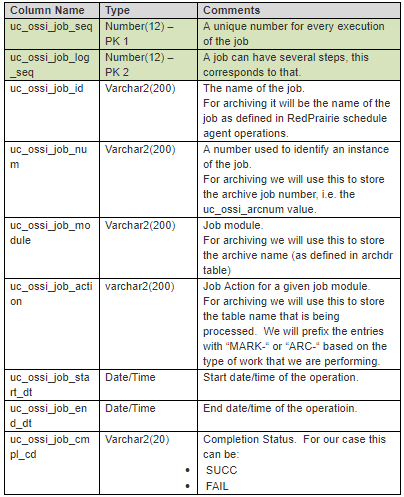
This table closely follows the Oracle concepts of “client_info”, “module”, and “action” that are used to monitor the sessions. We have put the information in a de-normalized fashion to simplify the query capabilities. For a typical run the data would look like:

We will commit the entries in this table right away (without impacting the active transaction). This will allow the users to query the table to see the current status of the activity. It has summary rows for the whole job and the whole archive. The user will be able to use this to compare the performance over time.
If we encounter an error, we will update the corresponding row in the above table with “FAIL”. The error details will be available in the uc_ossi_job_err_log table. That table will refer to the above table so we will know exactly which step failed and how.
The users can use the API for the above tables in their own jobs so that the information from those jobs is also available in this fashion.
Application to View the job history
This DDA will allow the user to query the data from the uc_ossi_job_log table. The user will be able to look at the errors for a given job from here as well.
Policy for storing archive parameters
Standard JDA/BY implementation uses hard-coded values within the “list command” to specify the appropriate filter criteria. Our solution will use the following policy structure.

Before executing the archiving logic for a specific archive, we will fetch data from this policy. We will publish the various parameters on to the stack. For example for the case above, a variable called “ARC_PARM_NUM_DAYS_FOR_SHIPMENTS” will be available on the stack. The various “List Commands” can then use this variable.
The policy variable of a specific archive will override the default value.
Archiving Logic
1. Generate a new archive job number
2. For each of the archive jobs that needs to be executed
a. Verify that “uc_ossi_arcnum” column exists on this table. If not raise an error.
b. We will use the “List Command” to define a command that will mark the rows that need to be archived in the table. This command will use an “update” statement with a “where” clause — which is much faster than selecting the data and updating by primary key. We will update the rows with the archive job number generated above.
c. For each object in the “Details”
i. Verify that “uc_ossi_arcnum” column exists on this table. If not raise an error.
ii. We will use the “List Command” to mark the rows (same as 2.b above). The command will use a correlated query with the main table along with suitable join criteria to accomplish this. We will not do this by scanning the primary table rows one at a time — a single update will accomplish this.
d. By this time we will have marked the rows in the primary table and all of the dependent tables with the archive job number. Now we will go through all of these tables and transfer them to the archive instance.
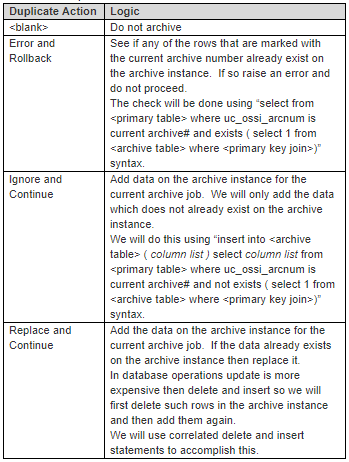
We will use database links (on oracle) or Linked Servers (on SQLServer) to move this data to the archive instance. We will handle the various “Duplicate Actions” as follows:
e. Now run the “Post Archive” command. This command typically has a purge command that purges the main table and the dependent data. If that is the goal then this command does not need to be used an instead the “purge_flg” may be checked.
f. If “purge_flg” was checked, then delete the rows from the tables that were identified earlier (Step 2.d).
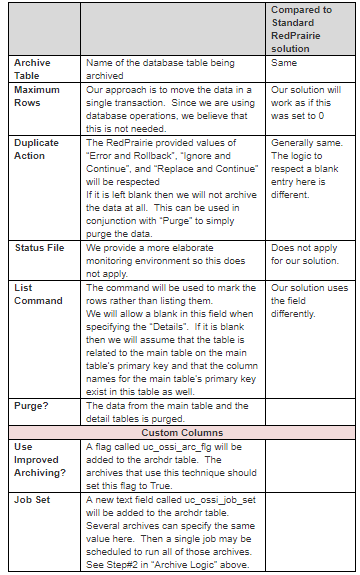
The users will still use the “Database Archive Maintenance” application. The setup will be as follows:
Standard Command Override
JDA/BY uses the “archive production data” command in order to archive the data. We will override this command to look at the “uc_ossi_arc_flg” column for the passed-in archive. If the archive is defined as such we will use the improved archiving technique defined here otherwise it will default to the standard RedPrairie logic.
Summary
Archiving and Purging are critical for every JDA/BY installation. Some of the JDA/BY tables grow rapidly and if the data is not archived properly it can lead to significant performance degradation. We expect remarkable improvement using this technique. We expect the performance improvement to be manifold.
Customers will find improved job visibility useful as well. The users will be able to see details about the job execution. We will stamp the archive rows with the specific job that moved the data. This will provide assistance during troubleshooting.
Copyright Notice
· RedPrairie is a registered trademark of RedPrairie (https://blueyonder.com/)
·Smart IS International is a registered trademark of Oracular IS LLC (https://www.smart-is.com/)
· This document contains information about the JDA/BlueYonder software. It is assumed that the recipient has legal access to the said software.
Originally published on saadwmsblog.blogspot.com